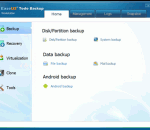
Users are faced with essential challenge: the need to secure PC and important files, such as system, photos, music, applications, emails, personal data in libraries and financial documents. Just one click to protect your PC with it. If you lose any files or need to go back to an earlier version, don’t worry, you can recover them in time. EaseUS Todo Backup Workstation is complete backup & recovery solution for home office & business users.
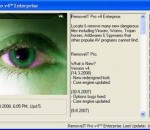
RemoveIT Pro - SE. Locates & Removes many new dangerous Spyware, Malware, Virus, Worms, Trojan's and Adware that other popular AV programs do not find. RemoveIT Pro. What's New? Version - SE (10.7.2013) - New refreshed look. - Core engine updated. - New features included. - Few bugs fixed.
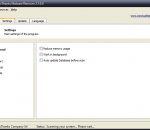
NoVirusThanks Malware Remover Free is a useful Windows OS utility designed to detect and remove trojans, spyware, rogue software, adware and other malicious threats installed in your computer. It is possible to scan for system hijacks, browsers hijaks, hosts file hijacks and fix all modified parameters to original values. The new detection engine “Behavioral Analysis” is able to detect new and unknown malware even without up-to-date signatures. We have included also a mini privacy cleaner, that can scan for traces in temp folders, java cache, flash player and cookies. Since most malware drop malicious files in temp folders, this option should help in cleaning suspicious dropped files in temporary folders. Is possible to automatically update the signature database, check for application updates and scan the system when Windows starts. We have also optimized removal procedures, making sure to remove also persistent and hard-to-remove malware. With the “Flash Scan” is possible to scan the system in about 2 minutes for a very fast scanning. Features Accurate Malware Disinfection Methods Create system restore point Fast System Scan Quick System Scan and Full System Scan Remove persistent trojans Remove Rogue Software and Unwanted Applications Remove Trojans Spyware and Worms Scan browser hijacks Scan hosts file Scan Processes Modules and Registry Scan system hijacks Start with Windows Very user-friendly GUI
Based on #1 ranked BitDefender antivirus technology and IObit anti-malware engine, Advanced SystemCare with Antivirus 2013 incorporates top anti-virus capabilities, as well as the already proven comprehensive PC tune-up ability. With its real-time protection against viruses, spyware and phishing attacks, powerful tuning-up and cleaning functionality, Advanced SystemCare with Antivirus 2013 provides always-on, automated, and all-in-one protection against all kinds of security threats, system slow down, freeze and crash. It ensures PC security, and maintains maximum computer performance automatically without slowing down your system. Advanced SystemCare with Antivirus 2013 is compatible with other security software like anti-virus, anti-malware, firewall, etc. Features: *Based on Dual engine: award-winning anti-virus engine and IObit anti-malware engine *Defends against possible virus infection, while speeds up PC rapidly in the meantime *Scans and detects more threats, proven by generally recognized testing organization * Fast scanning ability provides reliable protection against viruses, spyware and other threats. *Real-time and proactive protection detects and stops all kinds of malicious behavior *Rapid virus database updates provides high-level of detection and keep your protection current *Scans and removes spyware and adware with the latest definition *Prevents spyware, hijackers and malicious websites *Erases the history of all activities on your computer *Scans and fixes invalid and improper registry entries *Detects and removes invalid startup items *Searches and Cleans up Windows trash files *Repairs system configurations, Eliminates System Bottlenecks and Prevents Crashes *Tune up Windows to improve both system and Internet performance, unleashes the power of your Windows *Analyzes and Shows detailed information of hardware and Windows *Finishes all Work with one click, Super Easy to Us
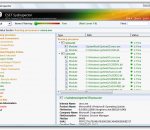
ESET SysInspector is a free, state of the art diagnostic tool for Windows systems. It is also an integral part of ESET Smart Security 4 and ESET NOD32 Antivirus 4. It peers into your operating system and captures details such as running processes, registry content, startup items and network connections. Once a snapshot of the system is made, ESET SysInspector applies heuristics to assign a risk level for each object logged. Its intuitive graphical user interface enables the user to easily slice through the large volume of data using a slider to select objects of a particular color coded risk level for closer examination. ESET SysInspector is a convenient utility for the tool box of every IT expert and first responder. Key Features: * Ability to generate and save a detailed log to be used by an IT expert or uploaded to an online forum for diagnosis * Option to exclude private, personal information from being saved in logs * Integrated Anti-Stealth technology allows discovering hidden objects (e.g. rootkits) in MBR, registry entries, drivers, services and processes * Ability to compare two existing logs for differences makes it easy to detect changes over time * Log entries are assigned a color code risk level for easy filtering * Intuitive hierarchical navigation of logs * Fast and compact single file executable, ideal for first responders to run from a USB drive without lengthy installation
AVG Anti-Virus Free Edition is trusted antivirus and antispyware protection for Windows available to download for free. In addition, the new included LinkScanner® Active Surf-Shield checks web pages for threats at the only time that matters - when you're about to click that link. AVG Anti-Virus Free has these following features: Award-winning antivirus and antispyware Real-time safe internet surfing and searching Quality proven by 80 million of users Easy to download, install and use Protection against viruses and spyware Compatible with Windows 7, Windows Vista and Windows XP AVG Anti-Virus Free Edition is only available for single computer use for home and non commercial use. This is the 32-bit version.
This premium security package represents the perfect alternative to classic Internet Security Suites. Antivirus, Anti-Malware and Firewall - all in one, but each included product is world class in its category. Emsisoft Anti-Malware: Anti-Malware is the covering term for Antivirus, Anti-Trojan, Anti-Spyware, Anti-Bot and protection against all other dangers on the internet. It contains the awarded dual-scanner to check and clean infected computers, as well as three powerful guards that effectively prevent new infections. * Comprehensive protection from Viruses, Spyware and other Malware. * Two combined ultra-fast scanners for cleaning. * Live behavior analysis of all active programs - against new dangers. * Surf protection which blocks access to known fraud and malware websites. Emsisoft Online Armor Firewall: Online Armor complements Emsisoft Anti-Malware with a bullet proof Firewall - perfect to provide an overall protection. Online Armor's HIPS component locks your operating system and lets only known good programs and data pass through. * Firewall to block unknown and suspect data transfers. * Program guard - allows only known good programs. * Anti-Keylogger - detects hidden logging of your keyboard input. * Banking mode for secure online banking
Solo antivirus software not only scans for all viruses, it contains a unique System Integrity Checker to protect you from new Spyware, Internet Worms, Backdoor programs, malicious VB and Java scripts. It also effectively removes all existing Internet Worms, File infecting viruses, malicious VB and Java scripts, Trojans, Adware, Spyware, Backdoors, boot sector, partition table, file and macro viruses. Solo Antivirus features: * World Class Antivirus at an Affordable Cost * Ultra fast scan engine. Scans files on the fly. * Anti-spyware detection available * Solo Antivirus 2012 version comes with much improved scan engine * Solo system integrity checker to stop new viruses and spyware * Solo sentry system scans active processes, and removes malicious process found in memory. * Automatic updates available. Solo update client checks pings our server for every one hour period and downloads update automatically. * Effective resource management - Solo uses very low percentage of system resources. So it won't affect your system performance unlike other antivirus software
If you use email or the Internet, you need extended protection. Avira Antivirus Premium 2012 not only combats viruses, worms, Trojans, rootkits, phishing, adware, and spyware, but also protects you while surfing and emailing thanks to WebGuard, AntiDrive-by, and MailGuard. Functions - AntiVir stops all kinds of viruses - AntiAd/Spyware protects against adware and spyware - AntiPhishing protects your data from phishing attacks - AntiRootkit detects hidden rootkits - AntiDrive-by prevents downloading viruses while surfing the Net - EmailScanner examines incoming and outgoing emails (POP3/SMTP/IMAP) - WebGuard checks downloads and websites for viruses - RescueSystem creates a bootable rescue CD - QuickRemoval removes viruses at the push of a button - NetbookSupport support for computers with low resolution - AHeADTechnology detects even unknown viruses by their profiles - AntiVirProActiv detects unknown viruses by their behavior patterns - GenericRepair automatic repair of your PC - ExpressInstallation install Avira in just 5 clicks Giving something back - up to five euros or 25% of every online sale goes to the Auerbach foundation that supports various social, scientific, cultural and charitable projects.
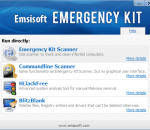
The Emsisoft Emergency Kit contains a collection of programs that can be used without a software installation to scan and clean infected computers for malware. Emsisoft Emergency Kit Scanner With the Emsisoft Emergency Kit Scanner you have got the powerful Emsisoft Scanner including graphical user interface. Search the infected PC for Viruses, Trojans, Spyware, Adware, Worms, Dialers, Keyloggers and other malign programs. Run the Emsisoft Emergency Kit Scanner with a double click on a2emergencykit.exe. Found Malware can be moved to quarantine or finally deleted. Emsisoft Commandline Scanner This scanner contains the same functionality as the Emergency Kit Scanner but without a graphical user interface. The commandline tool is made for professional users and can be used perfectly for batch jobs. To run the Emsisoft Commandline Scanner, do the following actions: - Open a command prompt window (Run: cmd.exe) - Switch to the drive of the USB Stick (e.g.: f:) and then to the folder of the executable files (e.g.: cd run) - Run the scanner by typing: a2cmd.exe Next you will see a help page describing all available parameters. Next is an example to scan drive c: with enabled Memory, Traces (Registry) and Cookie scan with active Heuristic module and archive support. Found Malware is moved to quarantine. a2cmd.exe /f="c:" /m /t /c /h /a /q="c:quarantine" Emsisoft HiJackFree HiJackFree helps advanced users to detect and remove Malware manually. With HiJackFree you can manage all active processes, services, drivers, autoruns, open ports, hosts file entries and many more. For your full control over your system. Emsisoft BlitzBlank BlitzBlank is a tool for experienced users and all those who must deal with Malware on a daily basis. Malware infections are not always easy to clean up. These days the software pests use clever techniques to protect themselves from being deleted. In more and more cases it is almost impossible to delete a Malware file while Windows is running. BlitzBlank deletes files, registry entries and drivers at boot time before Windows and all other programs are loaded.
Want protection for yourself and your family on the Internet? Panda Internet Security 2013 provides you with the most advanced protection against Internet threats. Lets you use the Internet for everything, like shopping and banking online, with total peace of mind. Keeps your inbox spam-free, and allows you to surf the Web privately and securely. Your children will navigate safely on the Internet with the Parental control. Remote access so you can use your PC when away from home Forget about identity theft and protect your personal data. Main features: Antivirus and Firewall Panda USB vaccine Antispam and parental control Plus! Safe browser (sandboxing) Virtual keyboard Identity protection Backup Multimedia/gaming mode Home network manager Remote PC access Benefits Easy - Panda Internet Security 2013 is truly Iinstall and forget. Light - All processes take place in Panda's cloud. Secure - Includes everything you need: antivirus, firewall, identity protection... Complete - Includes free first-class technical support. Panda Internet Security 2013 - That's why this antivirus is not for your computer, it's for you
Iperius Backup is one of the best free backup software, also released in commercial editions for those who need advanced backup features for their companies. The freeware version of Iperius Backup allows you to backup to any mass storage device, such as NAS, external USB hard drives, RDX drives, and networked computers. It has comprehensive scheduling and e-mail sending functions. It supports zip compression with no size limit, incremental backup, network authentication and the execution of external scripts and programs.
Kaspersky anti-virus protects you from the Phishing and Malware sites that you wouldn't otherwise know were attempting to steal from you. At the same time, the Kaspersky Security Network allows your computer to report when it discovers a threat that hasn't been seen before. All 250 million Kaspersky users benefit from our combined knowledge! Kaspersky features include: Protects from viruses, Trojans, worms, spyware, adware Scans files, email, and internet traffic Protects Instant Messengers Protects From Unknown Threats Analyzes and closes Internet Explorer vulnerabilities Disables links to malware sites / phishing sites Global Threat Monitoring (Kaspersky Security Network) Blocks all types of keyloggers Automatic Database Updates Free Technical Support Note: This is a 30-day commercial trial.