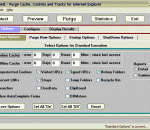
PurgeIE helps Internet Explorer users eliminate unwanted Internet files. This superb utility provides the tools you need to cover your surfing tracks and keep Internet-related garbage from overrunning your hard drive. PurgeIE enables you to easily remove a variety of leftover files that Internet Explorer leaves in its wake when you browse the Internet. Despite all of the bad press that Cookies have received, there are some good Cookies that contain stored passwords and preferences for Web sites you trust. These Cookies actually make your life easier. You just tell PurgeIE which ones to 'protect' and it will delete the rest. PurgeIE incorporates a Cookie Viewer with search functions to assist you in deciding which Cookies to mark for 'protection'. This allows you to quickly determine which Cookies contain your personal information. PurgeIE now has a function to randomize Cookies datal. Using the Protect Window, one can see the applicable Security Zone and the 'per-site' Cookie settings. Maintenance functions are implemented so that the user can easily change these settings from the Protect Window. Cache files, Cookies, Visited URLs, Typed URLs, History Folders, Strays, Recent Links, the IE UserData folder, Recycle Bin and the Windows Temp Folder are the current categories you can choose to eliminate. Iincludes functions for clearing Previous Searches and AutoComplete Forms. You can also specify time frames to retain your more recent cache files. PurgeIE has become quite popular among the Cache and Cookie utilities as it provides the user with several options and includes a preview function to you to evaluate the effect of each of the Purge options before their execution. PurgeIE manages its cleanup functions without requiring you to restart your system. Supports thru IE-10 and Win-8. A recent upgrade implements a tabbed User interface. The 15 trial days need not be contiguous.
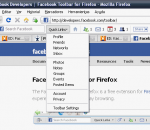
Integrate your Facebook life into your browser. Search Facebook from anywhere The Search Box allows you to easily search Facebook no matter where you are. Select a friend from the dropdown to go directly to their profile, or hit "enter" to see the search results. Get Notified Icons on the toolbar tell you how many new pokes, friend requests, and messages you have. A pop-up will notify you when your friends update their statuses, write a new note or interact with you on Facebook. Connect with Friends Click the icon to open the Facebook friends sidebar. You can sort your friends by name or status and easily interact with them and their profiles. Share Content The share button lets you share the page that you are currently browsing by sending it to friends or posting it to your profile. Upload Photos The upload photos button lets you find photos on your computer, caption and tag them, and upload them to Facebook.
The Karaoke Downloads toolbar is the tool you have been looking for if you want access to the KaraokeDownloads.tv website by providing a fast and convenient way to access your karaoke songs using your web browser. The digital karaoke store contains professional karaoke backing tracks and videos. Simply browse or search for the songs you wish to purchase then preview the video or audio version before you add it to your shopping cart. After you have completed your purchase of the karaoke song(s) you can download them to your computer immediately. The karaoke files sold in this store are in MP3+G format which is a well established type of karaoke file supported by most professional and popular karaoke players. You can also find karaoke player software for windows within the site which can be found bu using the karaoke downloads toolbar menu. The toolbar has a simple Internet search function and you can un-install the software it at any time. if you are making bulk purchase then the tool bar provides an quick way to access the login in and registration section of the digital download store. Maybe you want to make a quick karaoke download purchase and not register or sign up for an account. This can be done using an option that is also right there in the toolbar menu for you. Downloading legal karaoke songs is now easy using the simple free karaoke downloads toolbar to access your karaoke songs.
Silver Bird is an open source Chromium extension that allows you to follow your Twitter account using Google Chrome. Features: Follow your timelines and navigate through your tweets; Compose, reply, RT, share, favorite and delete tweets; Create short URLs within the extension; Track read / unread tweets; Notify user whenever new tweets arrive; The extension updates itself as soon as new versions are available; Tweets caching to avoid hitting Twitter's API rate limit.
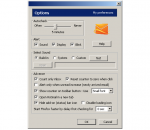
Watch for your new Hotmail and report to you in status-bar. Check Hotmail at specific interval. Neither username nor password is need. No seWatch for your new inbox Hotmail and report to you in status-bar. Check Hotmail at specific interval ( 5 min, 10 min, 15 min, 20 min, 30 min, 1 hour, 2 hour, 3 hour, 4 hour or manually). Can select to alert by sound, by notification window or by blinking icon. You will not need to make any further actions, simply login once then forget about it. High security. No need to input username and password. Nothing storage. This extension use Browser cookie to get information. So, security level is the same as Hotmail website security. This extension work only after you log on at the Hotmail website. As long as you stay log on, this extension still work. If you log out from Hotmail website, this extension log out too !nsitive information storage.
The Torrent Toolbar searches in 1 click many popular BitTorrent sites and automatically matches available Subtitles translations from various subtitles sites in your language(37 different languages), saving you a lot of hassle and time. The subtitles Column For every Torrent for which a subtitles file is available, a flag indicating the language will be displayed. Click on the flag to download the subtitles file. Or if you prefer searching your favorite Tracker Site, our Torrent Toolbar adds subtitles language icons on the top torrent tracker sites!
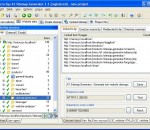
Download and archive entire websites such as forums, galleries, online books and articles. Copy and store websites on portable media such USB and CD. Download and convert websites from localhost, intranet, internet etc. Convert dynamic database driven websites into static. All links in the website can be converted to relative. Upload the downloaded website to mirrors and servers. Present websites to clients in offices with no internet access. Save webserver resources by not using server side code. Get everything from small to giant websites with many thousands of pages. Quickly download websites using multiple connections. Use include and exclude filters to control which files to crawl and list. Follow all kinds of references including redirects, frames, javascripts and images. Website downloader can even perform website login and handle cookies. Automate download of websites at times convenient to you, e.g. during the night.
This extension for Firefox and Google Chrome automatically inserts HTML signatures into your Gmail messages based on which address you are sending from. Blank Canvas Gmail Signatures is a Firefox extension that will help you by automatically inserting HTML signatures into your Gmail messages based on which address you are sending from. Supports up to four signatures for each address you have set up. Works for Compose Message and Reply / Forward. Features: * Use rich HTML signatures with images, styles, etc. * Works for Compose Mail, Reply, and Forward * Support for single or multiple email addresses * Create a different signature for each email address you use in your Gmail account * Supports up to four signatures per address * Real-time signature preview while editing signature HTML * Signature automatically inserted into message above (or optionally below) quoted text * Support for special characters * Easy setup and configuration interface
If you're not happy with the default skin of Google Chrome, you can download alternative theme files. Go to ChromoFans and look for something you like. Here's a Dark Seagreen Google Chrome Theme, you can free download it to enhance your Chrome Browse. Install Dark Seagreen Google Chrome Theme 1. Download Dark Seagreen Google Chrome Theme first. 2. Uncompressed the zip file to your local folder. Each zip file contains two files: the Google Chrome Theme file called "default.dll" and help document called "readme.htm" 3. Close Google Chrome if you haved launched it. 4. Replace your original default.dll(I suggest you make a backup of the original first). Here's the path where you need to replace the file: * In Vista: C:/Users/[your user name]/AppData/Local/Google/Chrome/Application/[current version]/Themes/ * In Windows XP: C:/Documents and Settings/User/Local Settings/Application Data/Google/Chrome/Application[current version]/Themes/ 5. Restart your Google Chrome. More information, please visit homepage
Welcome Wildcats Fans! This is a browser experience built especially for fans of K-State athletics. With the Kansas State Wildcats Theme, you'll enjoy a stunning Wildcats theme, quick links to K-State Facebook and Twitter pages, and easy access to KStateSports.com. Plus an easy way to un-install if necessary. SEARCH: Our primary revenue source is WebSearch+. We will reset your default search engine when installed so please give WebSearch+ a try! PRIVACY: We respect your privacy. We do track some data - but it's only numbers. We follow the total number of active themes, clicks on the extension buttons and themes using our search partners. That's it. UNINSTALL: We hate to see you go but if you want to uninstall, go to Tools - > Addons, and remove the extension from the Extensions tab in Addons. Thats it! ABOUT US: Brand Thunder works with leading brands to develop FREE custom IE, Chrome and Firefox add-ons. We have worked with the leading social networks, sports teams, news publishers, entertainment and gossip sites, colleges, blogs, radio stations, music as well as our own themes for football, baseball, soccer and the holidays - lots of exciting partners are on the way, so stay tuned!
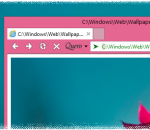
Quero is an enhanced navigation bar and ad blocker for Internet Explorer. Quero replaces the address/search box and find bar of IE10 by combining them into one address bar-like toolbar. Additionally, Quero includes an optional ad blocker to protect the user from intrusive Web advertising. Key features: - Tabs on top on a separate line (IE10, IE9) - Display the page title in the title bar (IE10, IE9) - One box for all: search and navigate to Web sites from one box - Ad & Flash blocker - Quick Type & Find (supersedes the find dialog) - Highlight search terms - Cursor search - Go to text URLs - Paste and go - Full page zoom - Display favicons in taskbar - IDN support with anti-spoofing techniques - Open Source IE add-on
Adobe Shockwave Player Over 450 million Internet-enabled desktops have Adobe Shockwave Player installed. These users have access to some of the best content the Web has to offer - including dazzling 3D games and entertainment, interactive product demonstrations, and online learning applications. Shockwave Player displays Web content that has been created using Adobe Director.