Steam is a game and download/update manager from Valve, the creators of Half-Life. Steam gives you full access to the way you’ve always wanted to play games. Buy and download full retail games, from new releases to classics. Check out demos and trailers of upcoming games. And make yourself at home in a community built by gamers, for gamers. It’s free to join and easy to use. Features: * Instantly access your favorite games The full Steam library and all future Steam releases are at your fingertips. After you've purchased a game, download it immediately and start playing. * Join the Steam Community Now it's easy to find someone to play with, meet up with friends, connect with groups with similar interests, and host and join chats, matches, and tournaments. Best of all, it's all free. * Chat with your friends while gaming With Steam's "Friends" service, you can talk to your friends while you play. You can also see when they're playing games and easily join the same servers together. * Easily browse multiplayer game servers Steam's integrated server browser makes it easy to navigate thousands of Internet game servers. * Receive automatic game updates Hunting for patches and downloading from unorganized web sites is so twentieth-century. On Steam, your games stay up-to-date by themselves. No hassles. * Play your games on any PC Once you have a Steam account, you can sign in from any PC to access your games. Your games are associated with your account, not your computer. * Enjoy Steam-only special offers From pre-release discounts to free-play weekends, Steam delivers what gamers value most.
The outSSIDer application was developed to be a small tool that scans for open WiFi networks and automatically tries to connect to them. Sound instructions let you close the laptop lid while walking down the streets hunting for WiFi. But outSSIDer is also useful at your usual hotspot places (home, work, etc) where you just start the program and lean back and wait for connection instead of clicking around manually. The connection is verified by trying to fetch www.google.com/favicon.ico to exclude payment hotspots and closed networks. The new Resume function resumes scanning if the connection is lost.
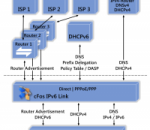
Connectivity with the new IPv6 network cFos IPv6 Link for Windoes x64 allows dial-up with IPv6 for Windows x64. Install cFos IPv6 Link, configure the dial-up connection to your ISP and you're done! cFos IPv6 Link does not only connect to the new IPv6, but also configures the routing and IP and DNS addresses automatically. Under XP cFos IPv6 Link also maps IPv4-based DNS queries of IPv6 adresses. cFos IPv6 Link is fast. Like cFos Broadband Connect it achieves a much higher throughput than the PPPoE driver shipped with XP/Vista/7 (with a fast enough Internet connection). At load time cfos IPv6 Link performs an auto-detection of the connected network devices and switches into one of the following modes: * Router mode: If cfos IPv6 Link detects a router or DHCPv6 server it uses this device to route data to the Internet. * Dial-up mode: If cfos IPv6 Link detects a PPPoE node connected to the network card (e.g. via DSL) it establishes a PPP/PPPoE connection to the Internet provider either automatically or on demand. * Mixed mode: If cfos IPv6 Link detects an IPv4 DHCP Server attached to the network card (regardless of other IPv6 devices), it passes all IPv4 traffic through to this IPv4 Router. This allows simultaneous use of IPv4 and IPv6. Windows prefers IPv6 by first trying to resolve an address to an IPv6 address and only uses IPv4 if no IPv6 address is (yet) available. IPv4 is thereby a fallback for IPv6. Mixed mode is possible with routers that support "PPPoE Passthrough", e.g. Speedport. Then the IPv4 traffic travels as usual to the IPv4 provider, while IPv6 traffic travels via PPPoE to the IPv6 provider. The cFos IPv6 Link application was designed to provide IPv6 Connectivity for Windows x64. Features at a glance: * IPv6 dial-up driver for Windows * Automatic routing and address configuration * IPv4 <-> IPv6 DNS mapping * DHCPv6 Stateful, Stateless, Prefix Delegation * High-speed, 10x faster than the Windows Vista driver * Configurable DHCP DUID * VLAN support
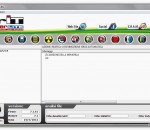
VirIT eXplorer Lite is a free Anti-Virus / Anti-Spyware for Windows. Cleans your computer from viruses, spywares, worms, trojans, backdoors, dialers, BHO (Browser Helper Object), LSP, adwares, hijackers, fraudtools, rootkits, keyloggers and malwares software. The features of VirIT eXplorer Lite are: 1) Intrusion Detection system in Real-Time; 2) Web Filter Protection for Internet Explorer 3) DEEP SCAN technology; 4) Heuristic virus scanning engine; 5) Macro Virus Analyzer; 6) Sort startup programs by date; 7) Scan and Clean ADS stream; 8) Fix Internet Explorer; 9) Process Manager; 10) Device Manager; 11) Automatic Live-Update via Internet; Now for Windows 8 and Server 2012 !!! VirIT eXplorer Lite includes a scanning engine that can detect a large percentage of next-generation or unknown viruses and malware, which have not yet been analyzed by AntiVirus researchers of C.R.A.M. (AntiMalware Research Center). Cleans new variant of TDL3, TDL4, TDSS, Sinowal (Zeus), Yoshi (Zero Access, Max+) and a lot of fraudtools.
Virtual Keyboard, Remote Controller, Desktop Controller, Keyboard, Enhancement, Android
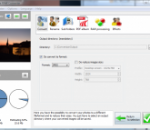
Simple and powerful tool to convert your RW2s. Rename and organize your photos in subfolders using EXIF/IPTC/XMP tags. Reads RW2 files and saves them into jpg, jpeg2000, gif, png, tiff... Optimized for multi-core processors Speed up your conversions by using 100% of your CPU.Get one year of update protection and technical support with the purchase of a license.
A free Youtube desktop app for your Windows PC. Watch and share the latest YouTube Videos, right from your desktop. Access billions of videos from the world's most popular online video community one-click away with the real-time notifications, directly from your desktop with this free desktop app for Pokki! This YouTube desktop app is made possible by Pokki, free software that brings a modern app experience for hundreds of free apps and games to your Windows PC. Features * Download the desktop app for free! * Easily upload and share video clips on YouTube and around the Internet. * Keep track of your favorite users' new videos. * Receive real-time notifications and alerts for activity of the users you follow. * Instantly record video with a webcam and Flash software.
Freecorder Toolbar is a revolutionary new browser-based audio recording program, combining state of the art recording technology, ease-of-use, and some great browser enhancements. And best of all, it's 100% FREE! Freecorder Toolbar is a complete audio recording solution It can record what you hear from your PC speakers or ecord from the microphone or line-in inputs on your PC. Freecorder Toolbar's unique Sound Separation Technology eliminates background noises. It has easy-to-use Record, Stop and Pause functions just like a tape recorder. It's really fun to see recordings happening with the cool Recording Visualizer. All you recordings will be saved as MP3 or WAV files. The program supports all Windows versions, including Windows Vista and will work with any sound card, even those that don't support recording. Freecorder Toolbar contains no spyware, adware or viruses. Also includes a powerful Google-based search, and optional browser enhancements like a radio player, weather bug, pop-up blocker, search highlighter and more. And best of all it's 100% FREE! Downloading only takes seconds. The program is only 2MB. So what are you waiting for? Get it now!
TRC are pleased to announce the web release of a free data recovery utility ChkBack. Developed specifically to help Microsoft Windows users regain access to lost data caused by the Microsoft ChkDisk utility. After the program is installed it can be used to analyse chk files to determine their original format. The utility will interrogate each file in the selected directory and test them against a set of common hexadecimal file headers.
Sketsa is a cross platform vector drawing application based on SVG. Scalable Vector Graphics (SVG) is a graphics format and technology based on XML developed by W3C. With Sketsa, you can create vector graphics that can be scaled and printed at any resolution, without losing detail or clarity. You also can get instant visual feedback on what you changed. Sketsa features various tools for optimizing content creation, giving designers unsurpassed support for creativity. This tools include property palette, source editor, defs editor, SVG specific shape tools, transformation tools, and additional illustration tools. It uses SVG as a native file format.
MagicISO is a powerful CD/DVD image file creating/editing/extracting tool. It can open / create / edit /extract CD/DVD image files, and it can convert bin to iso and back. as well as make ISO file from DVD/CD-ROM or hard disk, and handle bootable information at meanwhile. It can also convert BIN or any other format file created by CD burning software (Such as Nero-Burning ROM, Easy CD Create) or virtual DVD/CD-ROM driver software (such as Daemon-tools) to standard ISO format. MagicISO has ability to create ISO image file. You can directly add/delete/rename files or folder in CD image file(s) with MagicISO. MagicISO can handle up to 10G large sizes so that user can extract / edit / open DVD image files in ease. You can use MagicISO to make CD/DVD image from DVD/CD-ROM to hard disk in order to backup CD/DVD or use it with virtual CD or Virtual machine. MagicISO has ability to make bootable CD/DVD image file. With MagicISO, you can process the boot information for CD/DVD image file, as well as directly add/remove/extract boot image for the CD/DVD image file. MagicISO can also make multiple bootable CD/DVD image file. Using this function, you can combine multiple OS installation CD into one CD/DVD image file in order to install multiple OS from one CD/DVD. MagicISO embed Windows Explorer and use the double window unification user contact interface. Use the quick button and the mouse Drag & Drops files between Windows Explorer and MagicISO so that you can handle the CD/DVD image file easy but powerful enough.
GOM Media Player The only media player you need - for FREE! Not only is GOM Media Player a completely FREE video player, with its built-in support for all the most popular video and Media Player formats, tons of advanced features, extreme customizability, and the Codec Finder service, GOM Media Player is sure to fulfill all of your playback needs. With millions of users in hundreds of countries, GOM Media Player is one of the world`s most popular video players. Whats New : Added "Touch Setting" feature for touch screen devices. Added "Search box" feature on playlist. (Ctrl+F) Supported "HTTPS URL" for youtube or net radio playback. (Ctrl+U) Added "Music Tap" on preferences related to play music files. Improved performance related to "speed of add & delete" of files on playlist. Other miscellaneous corrections, fixes, and changes
Iperius Backup is one of the best free backup software, also released in commercial editions for those who need advanced backup features for their companies. The freeware version of Iperius Backup allows you to backup to any mass storage device, such as NAS, external USB hard drives, RDX drives, and networked computers. It has comprehensive scheduling and e-mail sending functions. It supports zip compression with no size limit, incremental backup, network authentication and the execution of external scripts and programs.
Maryfi is a free and easy to use software router for Windows 7, 8 , and 8.1 computers. With Maryfi, users can wirelessly share any Internet connection such as: a cable modem, a cellular card, or even another Wi-Fi network. Other Wi-Fi enabled devices including laptops, smart phones, music players, and gaming systems can see and join your Maryfi hotspot just like any other Wi-Fi access point and are kept safe and secure by password-protected WPA2 Encryption.