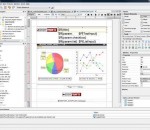
iReport is the free, open source report designer for JasperReports. Create very sophisticated layouts containing charts, images, subreports, crosstabs and much more. Access your data through JDBC, TableModels, JavaBeans, XML, Hibernate, CSV, and custom sources. Then publish your reports as PDF, RTF, XML, XLS, CSV, HTML, XHTML, text, DOCX, or OpenOffice.
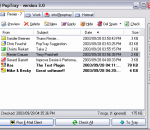
PopTray started as a little POP3 mail checker I wrote, because I couldn't find a freeware program that had all the features I wanted. Since then, new features have been added by request. After years of refinement PopTray 3.0 has now become a full-featured, customizable, e-mail notifier, but keeping its ease of use. Main Features: * Unlimited number of Accounts * Show number of messages directly on the TrayIcon (rotating by account) * Quickly preview a message * Delete messages from the server without downloading them * Rules that identify a message according to your criteria, then does one of these actions: o Play different notification sound o Delete from the server o Run any EXE file o Mark as Spam o etc ... * Configurable Hot-keys/Mouse-Buttons/Command-Line options for most functions * Plug-in Support: o Protocol plug-ins (e.g. IMAP4, Hotmail, Gmail, etc.) o Notify plug-ins (e.g. Flashing scroll-lock light, ScreenSaver) * Spam management using rules and white/black lists * Mulitple notfications (play sound, pop-up, etc) * Translated into 30+ languages * Complete Install / Uninstall * Many More ... All this for FREE and Open-Source !
Angry Birds Space - from floating through space to using the gravity of nearby planets to set up spectacular trick shots, Angry Birds Space takes the gameplay that fans already know and love to a totally new level. With brand new birds, brand new superpowers, and a whole galaxy to explore, the sky is no longer the limit! The chase is on! After a giant claw kidnaps their eggs, the Angry Birds chase it into a wormhole and find themselves floating in a strange new galaxy – surrounded by space pigs! Luckily the Angry Birds have super powers of their own… Angry Birds Space introduces you to new adventures on planets and in zero gravity, resulting in spectacular gameplay ranging from slow-motion puzzles to lightspeed destruction. With brand new birds, brand new superpowers, and a whole galaxy to explore, the sky is no longer the limit! Also featuring the DANGER ZONE, the most difficult Angry Birds levels ever! Can you master the Danger Zone? Start a new epic story from the Angry Birds universe.
HP Support Assistant offers a single location for your computer support needs. From here, you can automate and schedule maintenance, troubleshoot problems, find information about your computer and related topics, and get assistance using self-help options or by contacting HP. This software is available for supported notebooks with supported operating systems.
SecureZIP for Windows Desktop combines ZIP compression and strong encryption to deliver a data-centric security solution. It allows IT administrators to enforce security policies and ensure data availability to your organization. It helps address your daily data security challenges, including protecting sensitive data, meeting compliance requirements, and reducing overall costs and operational overhead.
Dual Piano is one of the best music apps! You can use it as real piano to play classic music, impress your friends and family with your original piano tunes anywhere you go!
Microsoft Standalone System Sweeper Beta is not a replacement for a full antivirus solution providing ongoing protection; it is meant to be used in situations where you cannot start your PC due to a virus or other malware infection. For no-cost, real-time protection that helps guard your home or small business PCs against viruses, spyware, and other malicious software, download Microsoft Security Essentials*. To get started, please make sure that you have a blank CD, DVD, or USB drive with at least 250 MB of space. Next, download and run the tool – the tool will help you to create the bootable media required to run the software on your PC. * Your PC must run genuine Windows to install Microsoft Security Essentials. Help & How-To: I can’t create a bootable CD or DVD This topic contains solutions for issues you may encounter while trying to create a bootable CD or DVD with the Microsoft Standalone System Sweeper Beta. Symptoms An error message is displayed after attempting to create a CD or DVD with the Microsoft Standalone System Sweeper Beta. I can’t create a bootable USB This topic contains solutions for issues you may encounter while trying to create Microsoft Standalone System Sweeper Beta on a bootable USB. Symptoms An error message is displayed after trying to create a USB drive with Microsoft Standalone System Sweeper Beta. The files cannot be downloaded by Microsoft Standalone System Sweeper Beta This topic contains solutions for issues you may encounter while Microsoft Standalone System Sweeper Beta is running and trying to download files. Symptoms You receive an error that the download failed. The CD or DVD is not detected by Microsoft Standalone System Sweeper Beta This topic contains solutions for issues you may encounter while trying to create a bootable CD or DVD with the Microsoft Standalone System Sweeper Beta. Symptoms Before starting the Microsoft Standalone System Sweeper creation process, you insert a blank CD or DVD into the drive. After inserting the disk in the drive, Microsoft Standalone System Sweeper Beta prompts you that no CD or DVD is detected in the drive. The CD or DVD is not detected by Microsoft Standalone System Sweeper Beta This topic contains solutions for issues you may encounter while trying to create a bootable CD or DVD with the Microsoft Standalone System Sweeper Beta. Symptoms Before starting the Microsoft Standalone System Sweeper creation process, you insert a blank CD or DVD into the drive. After inserting the disk in the drive, Microsoft Standalone System Sweeper Beta prompts you that no CD or DVD is detected in the drive. How do I restart my computer after using the bootable media? The bootable media (CD, DVD or USB) starts the computer in the Windows Preinstall Environment (homepage and launches the Microsoft Standalone System Sweeper application for scanning and remediation of virus and malware. To restart the computer in the live operating system, follow these steps: 1. Close the Microsoft Standalone System Sweeper application by clicking the X button in the top right corner. 2. Click Yes to confirm. The computer will automatically restart in the live operating system.
IM+ Pro. One app, all your messaging. IM+ Pro supports all major IM services, including Windows Live Messenger, Facebook, Skype chat, Google Talk, AOL/AIM/iChat, Yahoo!, ICQ, Vkontakte, Mail.Ru Agent, Odnoklassniki, Yandex chat, Mamba.Ru, Mig33, SINA Weibo, Renren, Fetion, Gadu-Gadu, MeinVZ and Jabber.
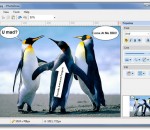
People always say 'a picture is worth 1000 words'. But sometimes a plain picture is just not enough. You may want to add annotation to the picture and let it carry richer and more accurate information. iPhotoDraw is a handy tool that's design exactly for that purpose. It helps you add annotations directly on photos. With iPhotoDraw, you can add description text, callout boxes (ballons), dimensions, detailed images, and other annotation objects to the pictures. You don't even need to worry your original pictures will be screwed up with additional drawings. If fact, annotations are stored in a separated file. The application is small and very easy to use.
Folder Protect offers 'Data in Use' security for your important files, folders, drive and programs. It lets you choose whether you want to write protect, delete protect, access protect or hide your data. The program also offers Safe Mode locking, stealth mode and hotkeys, auto-protection and password prompt on access of protected item. Folder Protect offers features that sets it apart from other password protection software.
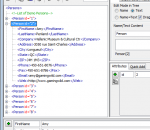
The Easy XML Editor is an easy-to-use code editor for XML files. With it you can view and edit XML data in a new, simplified way.
GOM Media Player The only media player you need - for FREE! Not only is GOM Media Player a completely FREE video player, with its built-in support for all the most popular video and Media Player formats, tons of advanced features, extreme customizability, and the Codec Finder service, GOM Media Player is sure to fulfill all of your playback needs. With millions of users in hundreds of countries, GOM Media Player is one of the world`s most popular video players. Whats New : Added "Touch Setting" feature for touch screen devices. Added "Search box" feature on playlist. (Ctrl+F) Supported "HTTPS URL" for youtube or net radio playback. (Ctrl+U) Added "Music Tap" on preferences related to play music files. Improved performance related to "speed of add & delete" of files on playlist. Other miscellaneous corrections, fixes, and changes
Iperius Backup is one of the best free backup software, also released in commercial editions for those who need advanced backup features for their companies. The freeware version of Iperius Backup allows you to backup to any mass storage device, such as NAS, external USB hard drives, RDX drives, and networked computers. It has comprehensive scheduling and e-mail sending functions. It supports zip compression with no size limit, incremental backup, network authentication and the execution of external scripts and programs.
Maryfi is a free and easy to use software router for Windows 7, 8 , and 8.1 computers. With Maryfi, users can wirelessly share any Internet connection such as: a cable modem, a cellular card, or even another Wi-Fi network. Other Wi-Fi enabled devices including laptops, smart phones, music players, and gaming systems can see and join your Maryfi hotspot just like any other Wi-Fi access point and are kept safe and secure by password-protected WPA2 Encryption.