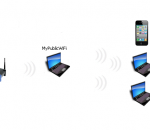
MyPublicWiFi: Turn your computer into a WiFi Access Point with Firewall and URL Tracking MyPublicWiFi is an easy-to-use software that turns your laptop/PC into a Wi-Fi wireless access point. Anyone nearby can surf the Internet through your sharing. This is also an ideal solution for setting up a temporary Access Point in a hotel room,meeting room,at home or the like. The MyPblicWiFi-Firewall can be used to restrict user access to specific servers. You can also prevent the use of certain Internet services (e.g. file sharing programs). MyPublicWiFi allows you to record and track all visited url pages on your virtual WIFI-Hotspot.
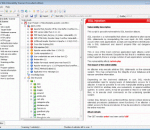
Acunetix Web Vulnerability Scanner first identifies web servers from a particular IP or IP range. After that, it crawls the whole site, gathering information about every file it finds, and displaying the entire website structure. After this discovery stage, it performs an automatic audit for common security issues. Acunetix Web Vulnerability Scanner is a software that automatically detects file inclusion.
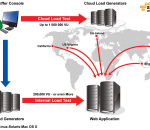
Proxy Sniffer enables you to quickly perform professional web load and web stress tests. Thus you can determine exactly how many users a web application can support. As a further result of the performance test in-depth and detailed measurement results give you valuable hints for tuning and optimizing the web application. No programming of load test scripts required, easy to use And no scripting or programming is required. All features of the Proxy Sniffer load testing tool are directly accessible from the high-performance, user-friendly graphical user interface. This saves you time, and significantly simplifies doing load tests. You will be surprised how easy and fast test procedures can be created and executed - even complex ones. With only a few mouse clicks, a wide range of professional features are at your disposal. Using innovative technology, Proxy Sniffer supports you in the implementation of load tests including: * HTTP/S Proxy Recorder and Web Crawler The recording of load test scenarios occurs through pre-surfing with any browser like Firefox, Safari or Internet Explorer via a universally useable HTTP/S Proxy-Recorder. Also the traffic of technical web client applications which exchange XML or SOAP messages over HTTP/S can be recorded. Alternatively, load test scenarios can also be recorded automatically using an integrated Web Crawler. * Unlimited Scalability - Simulating Thousands of Users Depending on the test scenario, hundreds of web users can already be simulated by only one load-releasing computer. The scalable architecture of the product supports additionally an unlimited load generation with thousands of users by a simple combination of several Windows and/or Unix-like systems to a homogeneous, load-releasing cluster. * Realistic Test Scenarios Several load tests can be run simultaneously. Multiple client IP addresses can be configured for each load-releasing system, allowing a web application cluster with a load balancer to be stressed in a realistic way. The network bandwidth for each simulated user can be artificially reduced in order to simulate slow access connections. * Support for all Current Authentication Methods Proxy Sniffer supports logging in to web applications with HTML form parameters as well as with HTTP basic authentication (username/password pop-up window), with Digest authentication, with NTLM authentication (Windows domain accounts) and with X509 client certificates (in PKCS#12 format). Each simulated user can be allocated an individual login account. * Real Simulation of Web Surfing Sessions For every simulated user an individual context is created during the load test execution. Together with the automatic support of session cookies Proxy Sniffer offers also to handle dynamically exchanged session parameters efficiently: e.g. hidden HTML form parameter or .NET VIEWSTATE parameter. * Automatic Protection from "false positive" Measurement Results During a load test, Proxy Sniffer compares the content of the received response with the content of the originally recorded response using a unique heuristic algorithm. This powerful feature allows the detection of errors at the application level (malformed web pages) - even when a web page with a correct HTTP response code is returned. This protection against "false positive" measurement results is automatically applied for each load test. Due to this protective mechanism, a clear improvement of the test quality is achieved - with no additional configuration effort.
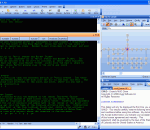
CMUD allows you to connect to and play hundreds of MUD Games on the Internet, and provides you many useful tools, such as aliases, actions, macros, keys, buttons, scripts, maps, databases, etc, to make your MUD player's life easier and more profitable. CMUD is a second-generation MUD client created by the authors of zMUD (Zugg's MUD Client). CMUD is mostly compatible with zMUD, but has been redesigned for improved stability and expandibility. There is a section in this manual dedicated to previous zMUD users that describe the major differences between CMUD and zMUD. CMUD is designed by MUD players for MUD players and is constantly being upgraded and improved. This manual is dynamic and is also being expanded and improved over time. If you are viewing this manual within CMUD, you should click the Get Updates button in the toolbar to download the latest updates to the help file from the web site. CMUD is designed for both the novice MUD player, as well as the advanced player. For novice players, the built-in list of all MUD games on the Internet makes it easy to get started. If you are a novice user, don't be intimidated by the large number of commands and features in CMUD. These features will not get in your way, but they will be waiting for you when you become more advanced. For advanced users, CMUD can be completely customized and scripted. You can create "robot" programs that respond to conditions on the MUD and take action for you. CMUD scripting can even be used to interact with other programs on your computer. As a scriptable Telnet client, CMUD can be used to automatically monitor a network, control routers, and more. Given the flexibility and power of CMUD, there is little you cannot accomplish. Features: Fast and Easy Scripting: · Compiled scripts are 2 to 10 times faster than zMUD. · Vast majority of zMUD scripts run without any changes in CMUD. · Compiling is performed behind the scenes. Your scripts just magically run faster. · Scripts are saved to a new database format...no more corrupted settings! · Scripts are automatically saved, even if your computer crashes. · New scripting features such as Local variables, #SWITCH and Named Arguments make scripts faster and easier to understand. · New script editor has better and faster syntax highlighting, code folding, line numbers, and many other features expected from a programmer's editor. · Integrated support for the Lua scripting language for very high-performance scripting. · Works with any other Windows scripting language. Scripting languages can be freely mixed, even within the same window. Built-in syntax highlighting for Lua, VBScript, JavaScript, Perl, Python, Ruby. Scripts can be easily shared: · New Package Library allows you to quickly and easily share scripts with other players. · Scripts can be searched based upon Category, MUD, or Author. · Scripts can be rated so you can tell which scripts are the best. · You can view comments about each script and add your own comment. · Sort scripts based upon Name, Popularity, or Rating. · Scripts can be exported/imported via a text-based XML format that can be posted to the forums or send to other users via email. Automatic Mapping: · CMUD and zMUD are the only MUD clients designed to create automatic maps as you move around the MUD on most any MUD that you want to play (doesn't require MUD support). Don't be fooled by cheap imitations! · Double-click on any room on the map to let CMUD compute the shortest path and automatically send the speedwalk directions to the game. · Room properties allow you to change visual appearance of rooms, and to assign scripts to specific rooms. · Maps can be easily edited and support custom room exits and portals. · New mapper in latest CMUD 3.x BETA allows you to track multiple locations on the same map. · Graphical enhancements such as a background image, custom room shapes, icons, and more can be added to your map.
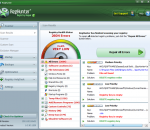
windows registry errors repair tool is an efficient registry cleaning software to fix these kinds of problems. It works with all Windows Operating Systems and scans Windows Registry quickly. This registry repair tool just needs a few easy steps to fix invalid Windows Registry entries and clean up junks within few minutes. It provides users with a list of the errors found. The process of using this tool is easy and simple.
MemScan is a handy command-line tool that was designed in order to help you perform a quick scan of your system's DOS memory. The MemScan toolkit includes MemScan, QMS, TestBoot etc. The best thing about it is that it doesn't need to be installed in order to properly function. Get MemScan and take it for a spin to see just how useful it can actually be for you when it comes to verifying the main DOS memory on your system!
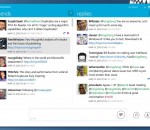
Drawing inspiration from Microsoft's Metro design language, MetroTwit celebrates an elegant and clean user interface that's beautiful to look at and a pleasure to read. It looks simple because it is simple. MetroTwit is proudly just a Twitter client and brings out the best Twitter has to offer with simple yet intuitive features. Taking advantage of the latest Microsoft .NET 4.0 and Windows Presentation Foundation 4 frameworks, MetroTwit is a first-class native application that shines on Windows. Get the whole story: · Follow the tweet breadcrumbs to read the entire Twitter conversation back-and-forth without missing a beat. Stay in the know: · Not sure what those ambiguous hashtags mean? Be in the know of all the fun trends on Twitter with convenient access to What The Trend. Infinite scrolling: · If you ever want to read more tweets, just scroll down and more will appear almost instantly. Be careful though, it's addictive and you could be scrolling for hours. URL shortening and previews: · Take control of links with an intuitive URL shortener that automatically saves you space and time tweeting. At the same time, worry less about where obscure links might take you by simply hovering over it. Autocomplete for usernames & hashtags: · The people and topics you care about, at your fingertips. Simply start typing any part of a username or hashtag and we'll find them for you. Windows 7 taskbar integration: · You don't have to switch away from what you're doing to keep tabs on new tweets. A counter in the taskbar will tell you exactly how many unread messages there are. Themes and accents: · Choose between dark text on light background and vice versa plus a selection of color accents to personalize the design. Better yet, match the application with your Aero Glass color for a more consistent look. Quick-glance notifications: · Read excerpts from new tweet updates as they cycle through in the notifications. If you run out of time, hover over the notifications to stop the countdown to read even more. Resizable and reorderable columns: · Not all columns must be created equal. You have the choice and flexibility to control exactly how your columns should look. Flawless high DPI support: · The vector-based user interface powered by Windows Presentation Foundation works and looks even better in high DPI.
Search Engine Studio automatically indexes your web site (using 4 methods e.g. HTTP crawler) and then creates a professional, ultra fast search engine for your website or an offline search for CD-ROM / DVD distributions. No installation on server required thanks to a built-in highly optimized database engine! You can fully customize the search results (no ads!) and has tons of Google-like features. Indexes HTML, PDF, Office,Flash docs & many more
CloudBerry Explorer PRO is an advanced Windows Client for Amazon S3. CloudBerry Explorer makes managing files in Amazon S3 EASY. By providing a user interface to Amazon S3 CloudBerry lets you manage your files on S3 just as you would on local computer. Browse S3 buckets, Copy and move file between S3 and local computer, Create and delete buckets, Setup ACL, Automate common tasks with Microsoft PowerShell, and more...
Your videos have never been this much fun! In seconds you can remove unwanted scenes, change playing order and add your own titles and text. Add a personal touch to your videos with background music and your own photos. Plus you can easily transform your photos into incredible slideshows.
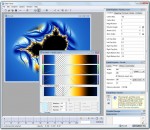
Ultra Fractal is the best tool to create fractal artwork and fractal animations. Whether you are a graphics designer, a video producer, a professional fractal artist or a complete beginner, Ultra Fractal will make it easy to create beautiful fractal pictures, animated textures and moving fractal backgrounds. The Animation Edition contains everything from the Standard Edition, plus animation and network features: create fractal movies and calculate fractals using multiple networked computers. The Animation Edition contains everything from the Standard Edition, plus animation and network features: create fractal movies and calculate fractals using multiple networked computers. FEATURES: Get started quickly with the integrated tutorials: · It is easy and fun to start using Ultra Fractal with the built-in tutorials. Starting with the basics, you will soon learn how to create your own fractals, change the colors, add layers, use masks, and even create animations. You can also download the PDF manual to print the tutorials. Explore thousands of fractal types and coloring options: · First explore the standard fractal types in Ultra Fractal to get familiar with them. Then connect to the online formula database to download thousands of additional fractal formulas and coloring algorithms contributed by other users. Enjoy unlimited deep zooming: · You can zoom to virtually unlimited depths with Ultra Fractal. Deep zooming is fully integrated and works with all fractal types and coloring options, even those you have written yourself! Tweak parameters with the versatile Explore feature: · Choosing parameter values is a breeze with the new Explore feature. Experiment with new parameter values by moving the mouse cursor over a coordinate grid in the Explore window, while the Fractal Mode tool window shows a real-time preview of the result. Color your fractals and add transparency effects: · Coloring your fractals is easy with Ultra Fractal's gradient editor. Drag the gradient curves up and down to create smooth ranges of colors, or use the Randomize options to quickly try various color combinations. You can also use the gradient editor to add transparency effects. Compose fractals with layers, masks, layer groups and Photoshop-like merge modes: · One of Ultra Fractal's key features is layering. You can place multiple layers of fractals on top of each other to combine them and create intricate coloring and texturing effects. Add mask layers to create transparent areas that will let the underlying layers shine through. Organize related layers in layer groups. Store layers or groups that you often use in the layer presets menu to access them quickly. You can even select multiple layers to edit their parameters together. Image import: · Import PNG, JPEG or BMP images in your fractals with the built-in image import feature. Simply select a coloring algorithm that contains an image parameter, and you can select any image on your computer to use. Open and organize your fractal files: · Organize all your fractal-related files with the integrated Explorer-like file browsers. Quickly scan formula files and parameters with the new thumbnail view and the powerful search tools. Render your artwork to produce fractal movies and high-quality images for printing and publishing: · Create stunning fractal movies and high-quality images in full color at any size and resolution with the Render to Disk feature. Built-in anti-aliasing and motion blur smooths and sharpens rendered images and removes jagged edges. Ultra Fractal exports and renders to JPEG, Photoshop, TIFF, PNG, Windows BMP, Targa, and AVI files.
GOM Media Player The only media player you need - for FREE! Not only is GOM Media Player a completely FREE video player, with its built-in support for all the most popular video and Media Player formats, tons of advanced features, extreme customizability, and the Codec Finder service, GOM Media Player is sure to fulfill all of your playback needs. With millions of users in hundreds of countries, GOM Media Player is one of the world`s most popular video players. Whats New : Added "Touch Setting" feature for touch screen devices. Added "Search box" feature on playlist. (Ctrl+F) Supported "HTTPS URL" for youtube or net radio playback. (Ctrl+U) Added "Music Tap" on preferences related to play music files. Improved performance related to "speed of add & delete" of files on playlist. Other miscellaneous corrections, fixes, and changes
Iperius Backup is one of the best free backup software, also released in commercial editions for those who need advanced backup features for their companies. The freeware version of Iperius Backup allows you to backup to any mass storage device, such as NAS, external USB hard drives, RDX drives, and networked computers. It has comprehensive scheduling and e-mail sending functions. It supports zip compression with no size limit, incremental backup, network authentication and the execution of external scripts and programs.
Maryfi is a free and easy to use software router for Windows 7, 8 , and 8.1 computers. With Maryfi, users can wirelessly share any Internet connection such as: a cable modem, a cellular card, or even another Wi-Fi network. Other Wi-Fi enabled devices including laptops, smart phones, music players, and gaming systems can see and join your Maryfi hotspot just like any other Wi-Fi access point and are kept safe and secure by password-protected WPA2 Encryption.